Back to the shelf

029

FICCI FLO Privilege Card

A digital privilege card for FICCI FLO: members present it on their phone, vendors scan a QR code to confirm.

Launched · Started March 2026 · PWA · Vibe-Coded

That's the whole thing.

The site's sound is off. The narration still plays.

This reading didn't load. The transcript is below.

Read the transcript

I wanted to replace physical privilege cards with something members would always have on them. So I built a digital version for a chapter of FICCI FLO, a members' organisation, starting in March twenty twenty-six.

The card lives on the phone now. No app store stands in the way. Members just add it to the home screen. At a partner vendor, you show the card. The vendor scans a QR code to validate membership and log the redemption. An admin dashboard covers member management, vendor onboarding, and usage. Points and badges add a little game.

I built it for one chapter first. That worked. Now it has expanded to other chapters. Take a look.

Narrated in my own cloned voice, generated with ElevenLabs v4.

I wanted to replace the physical privilege card with something members would always have on them.

I built a digital version for a chapter of FICCI FLO. It’s a progressive web app. You add it to your home screen the way you would any app, without going through an app store. The card lives on your phone.

When you visit a partner vendor, you open the card and present it. The vendor scans a QR code. That scan validates your membership and logs the redemption. No physical card, no manual tracking.

There are three roles, member, vendor and admin, each with its own view and row-level security. The admin dashboard lets chapter administrators manage members, onboard vendors and track how the card is being used. Points and badges sit on top of that as a light game layer. You earn recognition as you redeem.

I built it for one chapter first. That worked. Now it has expanded to other chapters.

Stack: HTML, Tailwind CSS, JavaScript. Vibe-coded with AI, started March 2026. Status: launched.

The making

  • HTML
  • Tailwind CSS
  • JavaScript
  • PWA

01 · The problem

Before it existed

What hurt

A privilege card sitting in a wallet is easy to forget, hard to check, and impossible to count. The chapter could not see which offers were being used.

Who uses it

  • Members of the chapter
  • Partner vendors
  • Chapter administrators
  • 136commits in six weeks
  • 3portals: member, vendor, admin
  • 15 sa QR code lives before it refreshes
  • 12vendor categories

02 · The flow

6 steps, in the order they happen

  1. 01 / 06

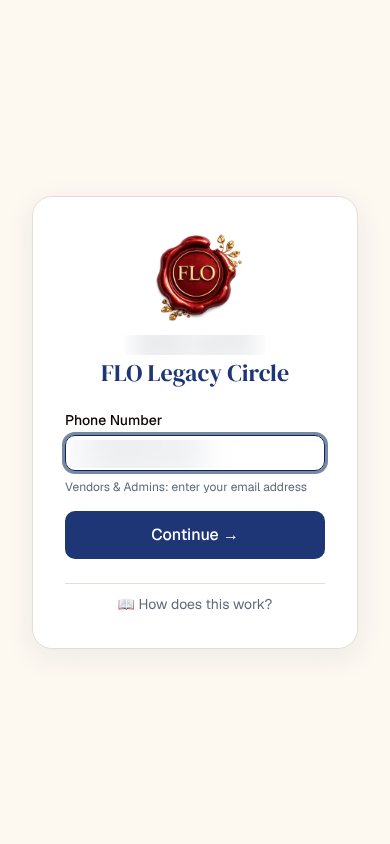
    Sign in with a phone

    You
    A member types a phone number
    It answers
    Sends each role to its own portal. Vendors and admins sign in with email
    A sign-in card with the FLO seal, a phone number field (blurred) and a link reading How does this work
  2. 02 / 06

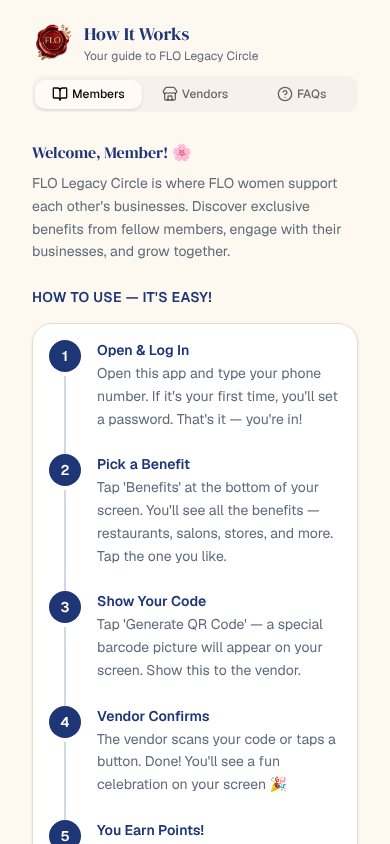
    Learn it in five steps

    You
    Opens the public guide, no login needed
    It answers
    Walks a member through logging in, picking a benefit, showing a code, confirmation and points
    A guide page with tabs for Members, Vendors and FAQs, and a numbered list of steps
  3. 03 / 06

    Show the code

    You
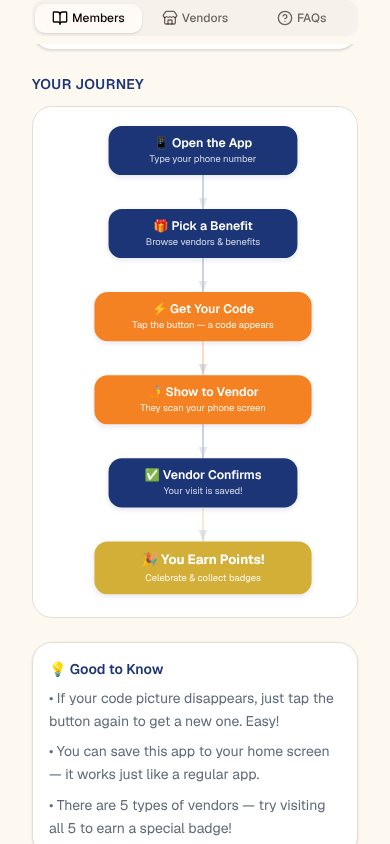
    Picks a benefit and taps Generate
    It answers
    Draws a QR code that refreshes every 15 seconds, so a screenshot is no use
    A guide diagram of the path from opening the app to earning points, as stacked blue and orange steps
  4. 04 / 06

    Vendor confirms

    You
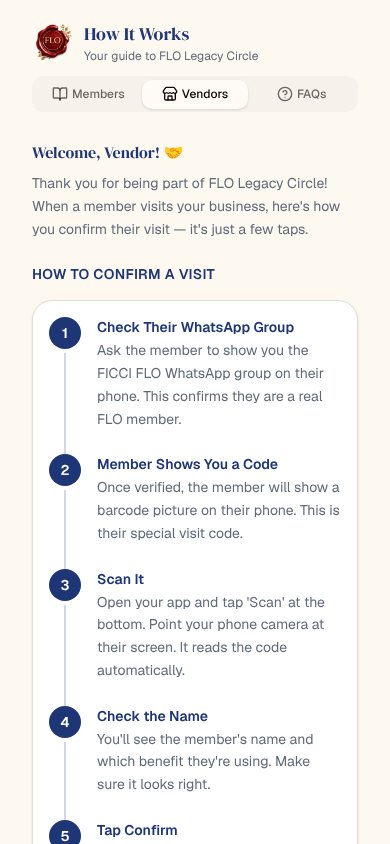
    The vendor checks the member, scans and taps Confirm
    It answers
    Validates the code, logs the redemption and shows the member’s name and benefit on the vendor’s screen
    The Vendors tab of the guide: five numbered steps for confirming a visit
  5. 05 / 06

    See it land

    You
    The member waits on the card screen
    It answers
    Updates live, plays a small celebration and adds the visit to the member’s history and badges
  6. 06 / 06

    Read the whole picture

    You
    An administrator opens the dashboard
    It answers
    Shows members, vendors, benefits and every redemption, with usage analytics

03 · What was special

What it stands on

  1. One login, three portals

    Members, vendors, and administrators share one sign-in and are sent to their own screens, each guarded by row-level security.

  2. A code that cannot be reused

    The QR is short-lived and checked on the server, and the vendor sees who and what before confirming.

  3. Recognition on top

    Points, explorer badges by vendor category, and milestones make redeeming a small game for members.

A card that proves itself at the counter.

Making-Of

A privilege card that lives on the phone and confirms itself at the counter.

The first commit on the repository

  1. The world before

    The chapter’s privilege card was a physical card. Vendors could not verify it quickly, and nobody could count how often it was used.

  2. One day

    7 March 2026. The day after the repository opens, one day of work delivers the member, vendor and admin portals, the QR flow and a first analytics page.

  3. Because of that

    1. 6 March 2026: repository opens from a fresh Next.js app.
    2. 7 March 2026: three portals, QR validation, live updates and the first gamification, then a string of fixes the same day. The vendor sign-in is removed so a vendor can confirm with one tap.
    3. 8 April 2026: launch preparation – an in-app guide, a welcome letter, vendor sign-in by email, and error boundaries after an analytics script crashed a page.
    4. 9 April 2026: automated checks and dependency updates added; vendor categories grow from 7 to 12; a badge celebration added.
    5. 20 April 2026: members are added by invitation, and admin-added members show as not yet signed up.
  4. Until finally

    A card app live for a chapter of FICCI FLO.

  5. Since then

    It was built for one chapter first. That worked, and it has since expanded to other chapters.

The evidence Process, hands, and artifacts

Process

  1. Origin

    A Next.js and Supabase progressive web app for the privilege card

  2. First build

    Member, vendor and admin portals, QR confirm, live updates, points and badges

  3. Simplify

    Vendor confirmation made one tap, with no login for the vendor

  4. Launch

    In-app guide, welcome letter, vendor email sign-in, error boundaries

  5. Hardening

    Continuous checks, dependency updates, 12 vendor categories

  6. Onboarding

    Members added by invitation rather than by hand

Hands

Akshansh

  • The product call: replace the physical card, no app store, one tap for the vendor
  • Every launch decision, from the sign-in rules to the categories

Agents

  • ClaudeCo-author on 75 commits, on Sonnet 4.6 and Opus 4.6
  • AmpCo-author on 22 commits
  • OzCo-author on one commit