Back to the shelf

017

Fleet Manager

A fleet management system that puts every vehicle, driver and trip in one place, built for a pharma transport department.

Launched · Started August 2025 · System · Vibe-Coded

That's the whole thing.

The site's sound is off. The narration still plays.

This reading didn't load. The transcript is below.

Read the transcript

The transport department at a pharma company ran on phone calls, manual logs and spreadsheets. Nobody had a single view of the fleet. That was the start of Fleet Manager.

I built it in September twenty twenty-five using Lovable, an AI app builder. Vehicle registration, driver assignments, trip logging, fuel tracking, maintenance schedules, reports and real-time fleet status: all in one interface. One source of truth for every vehicle, driver and trip.

It was a foundational step from paper to digital.

Shipping it taught me something. A single-page app needs routing set up correctly on its host, or real visitors hit page-not-found errors in production. That lesson stuck.

Built with React, TypeScript, Tailwind CSS and PostgreSQL. It launched. Take a look.

Narrated in my own cloned voice, generated with ElevenLabs v4.

The transport department ran on phone calls, manual logs and spreadsheets. No one could see the full fleet at a glance.

I built Fleet Manager from August 2025 using Lovable, an AI app builder. The aim was one interface, one source of truth, for every vehicle, driver and trip in the department.

It covers the full operation: vehicle registration, driver assignments, trip logging, fuel tracking, maintenance schedules, operational reports and real-time fleet status. Before this, those pieces lived in separate files and separate conversations. Now they live in one place.

Fleet Manager is launched. There’s no public link: it was built for internal operations, not the open web.

A single-page app needs proper routing rewrites on the host and correct in-app navigation, or real visitors hit page-not-found errors in production. That lesson only surfaces once you’re live.

The stack is React, TypeScript, Tailwind CSS, PostgreSQL and Vite. For the transport department, this was the foundational step from paper to digital: the first time every vehicle, driver and trip shared a single record.

The making

  • React
  • TypeScript
  • Tailwind CSS
  • PostgreSQL
  • Vite

01 · The problem

Before it existed

What hurt

The transport department ran on phone calls, paper logs and spreadsheets. Nobody could see every vehicle, driver and trip in one place, and insurance and pollution dates slipped.

Who uses it

  • Transport department staff
  • Fleet in-charge
  • Drivers
  • Management
  • 260commits over 15 months
  • 7sections from one home screen
  • 2,893logbook trips imported

02 · The flow

8 steps, in the order they happen

  1. 01 / 08

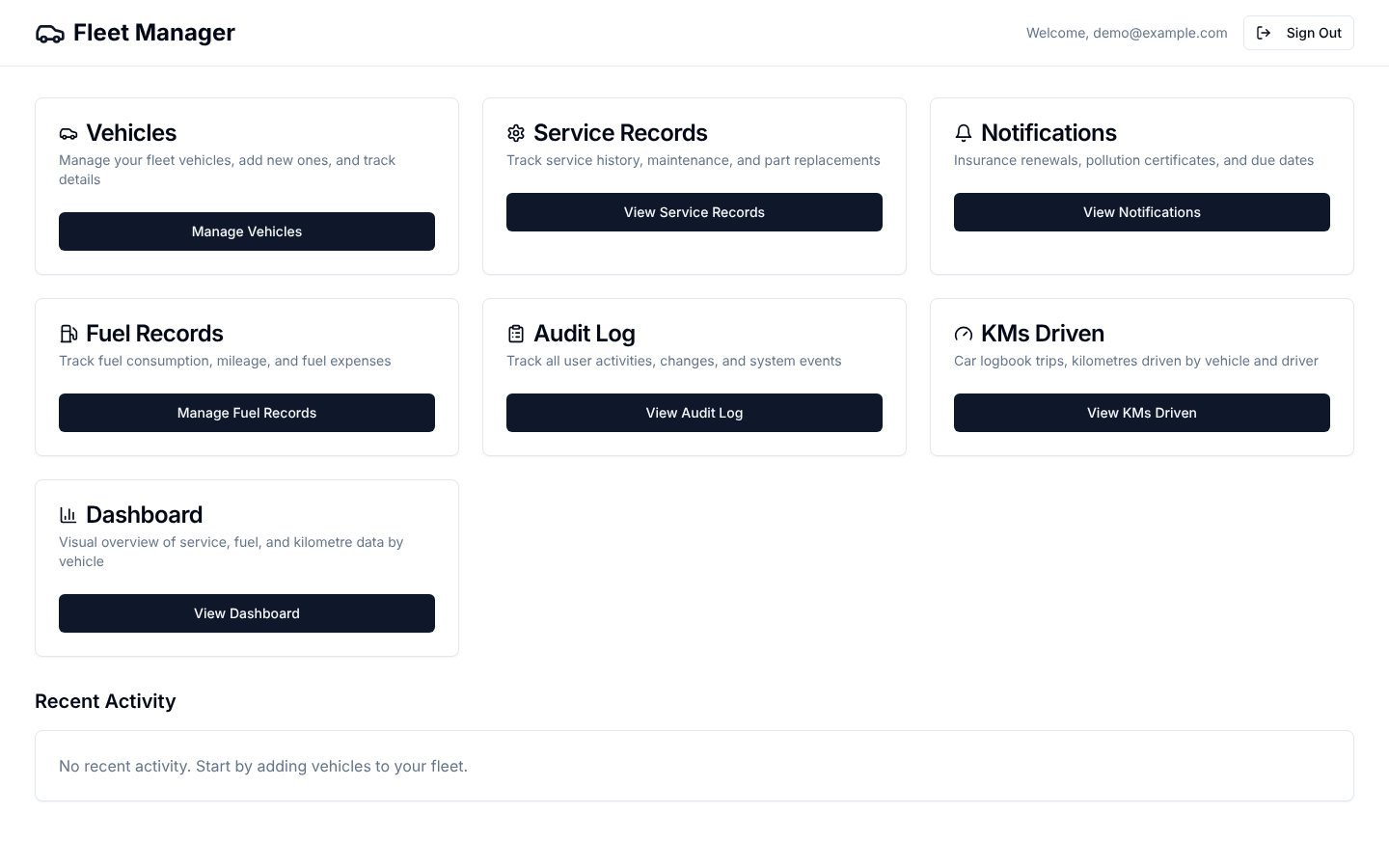
    Open the fleet home

    You
    Signs in and lands on one menu
    It answers
    Offers vehicles, service, fuel, trips, alerts, audit and dashboard, each as a card
    Fleet Manager home: seven cards for vehicles, service records, notifications, fuel, audit log, KMs driven and dashboard
  2. 02 / 08

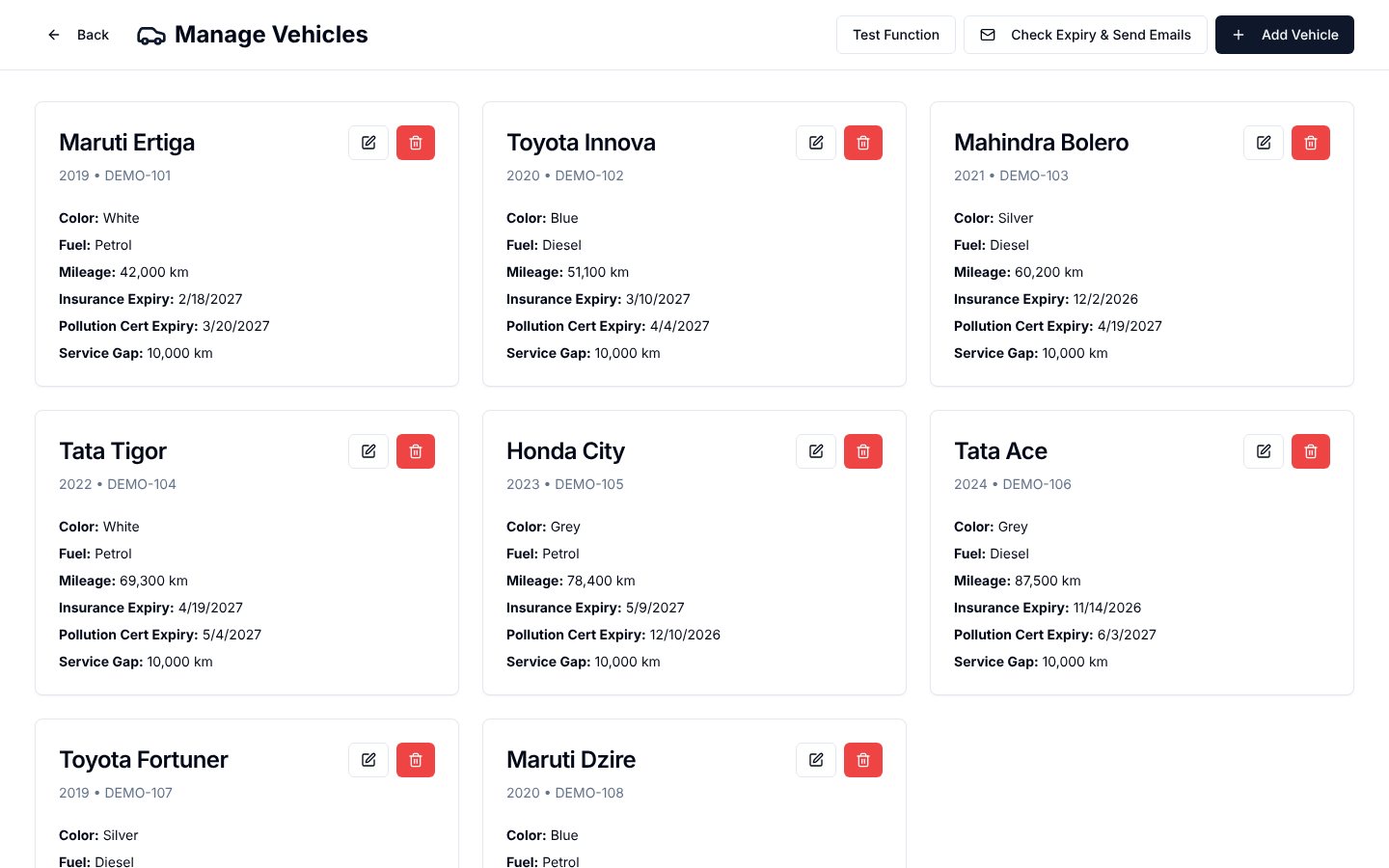
    Register the vehicles

    You
    Adds a vehicle with its papers
    It answers
    Keeps make, fuel, mileage, service gap and the insurance and pollution expiry dates
    Vehicle cards showing make, model, plate, mileage and expiry dates
  3. 03 / 08

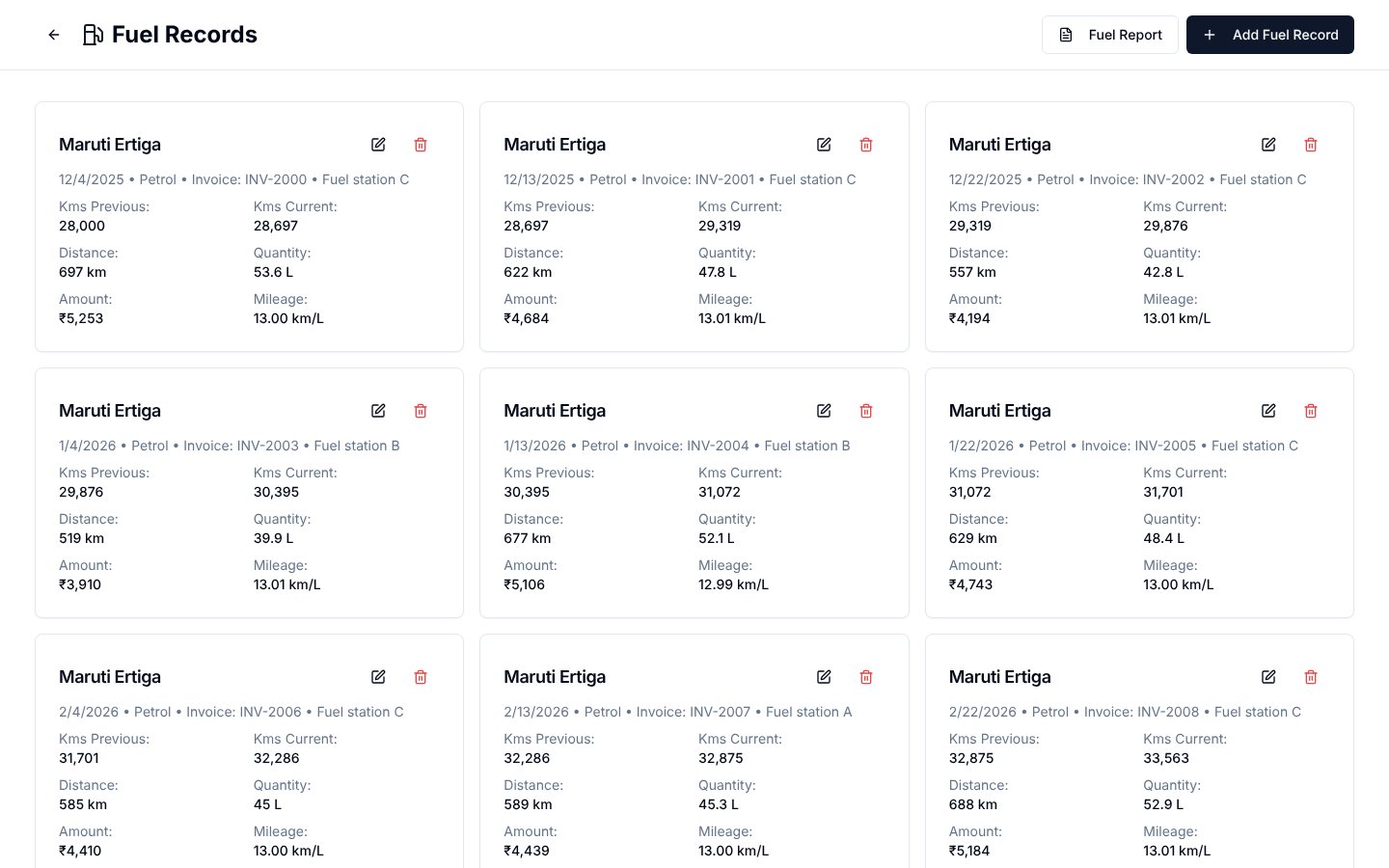
    Log every fill-up

    You
    Enters the fuel, the pump slip and the reading
    It answers
    Fills the previous reading itself, refuses a duplicate slip, works out the mileage
    Fuel record cards with kilometres before and after, litres, amount and mileage per litre
  4. 04 / 08

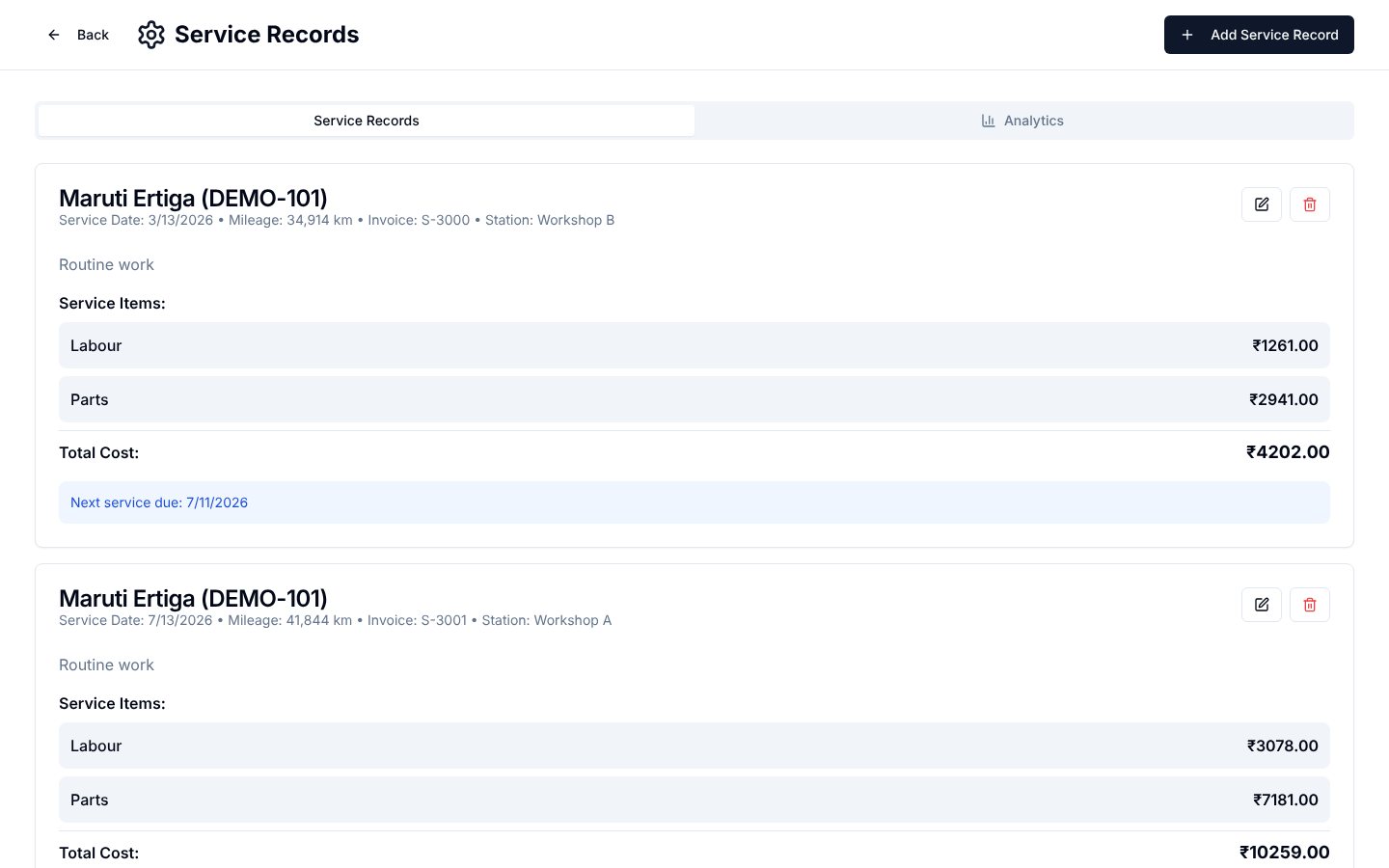
    Record the service

    You
    Adds a service with its items and invoice
    It answers
    Totals the cost, flags a duplicate invoice and shows when the next service is due
    Service records with labour and parts lines, total cost and next service date
  5. 05 / 08

    Count the kilometres

    You
    Reads trips by vehicle, driver and date
    It answers
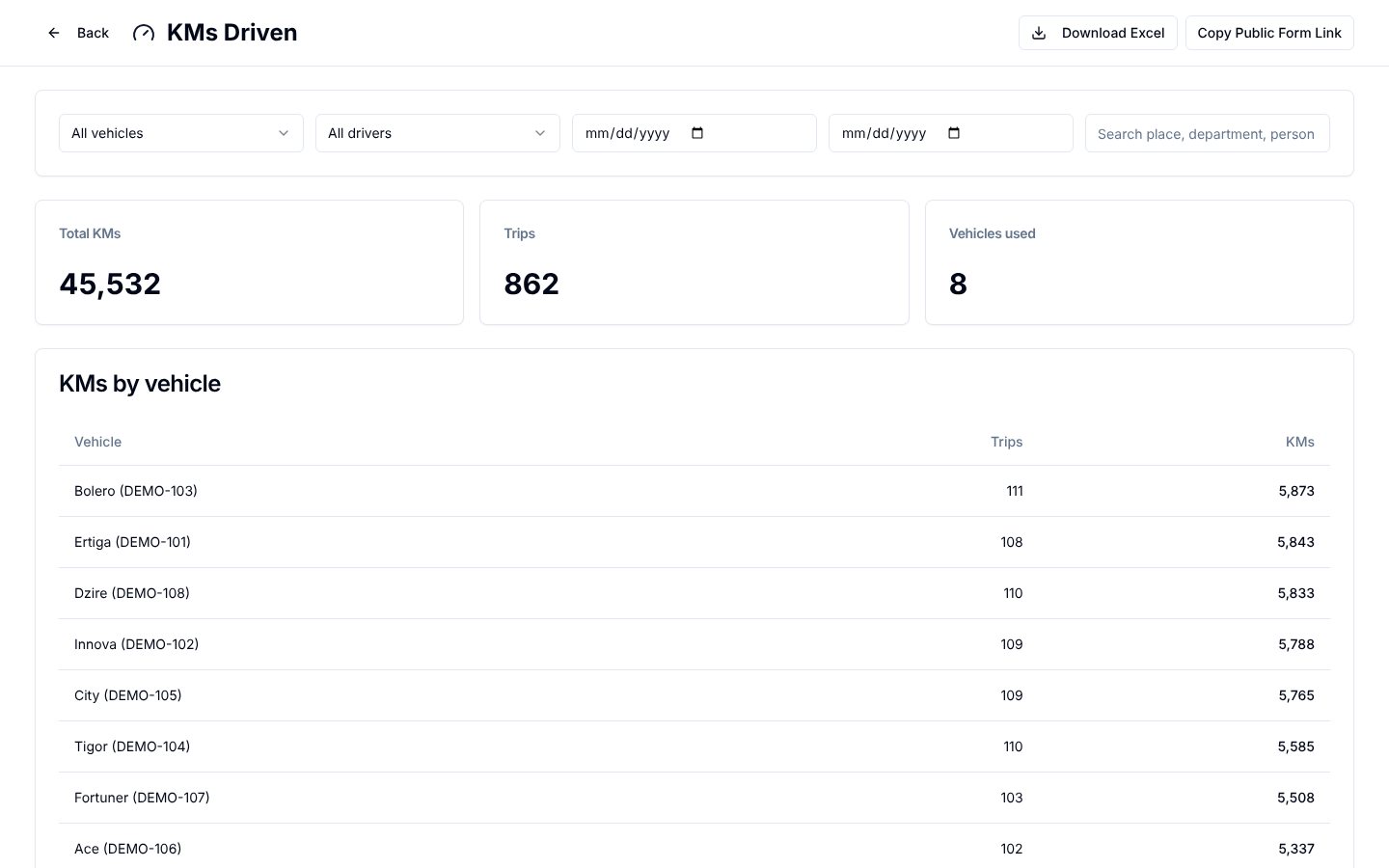
    Sums kilometres and trips per vehicle; a public form lets drivers log their own
    KMs Driven with totals for kilometres, trips and vehicles, and a table by vehicle
  6. 06 / 08

    Read the dashboard

    You
    Picks a measure and a period
    It answers
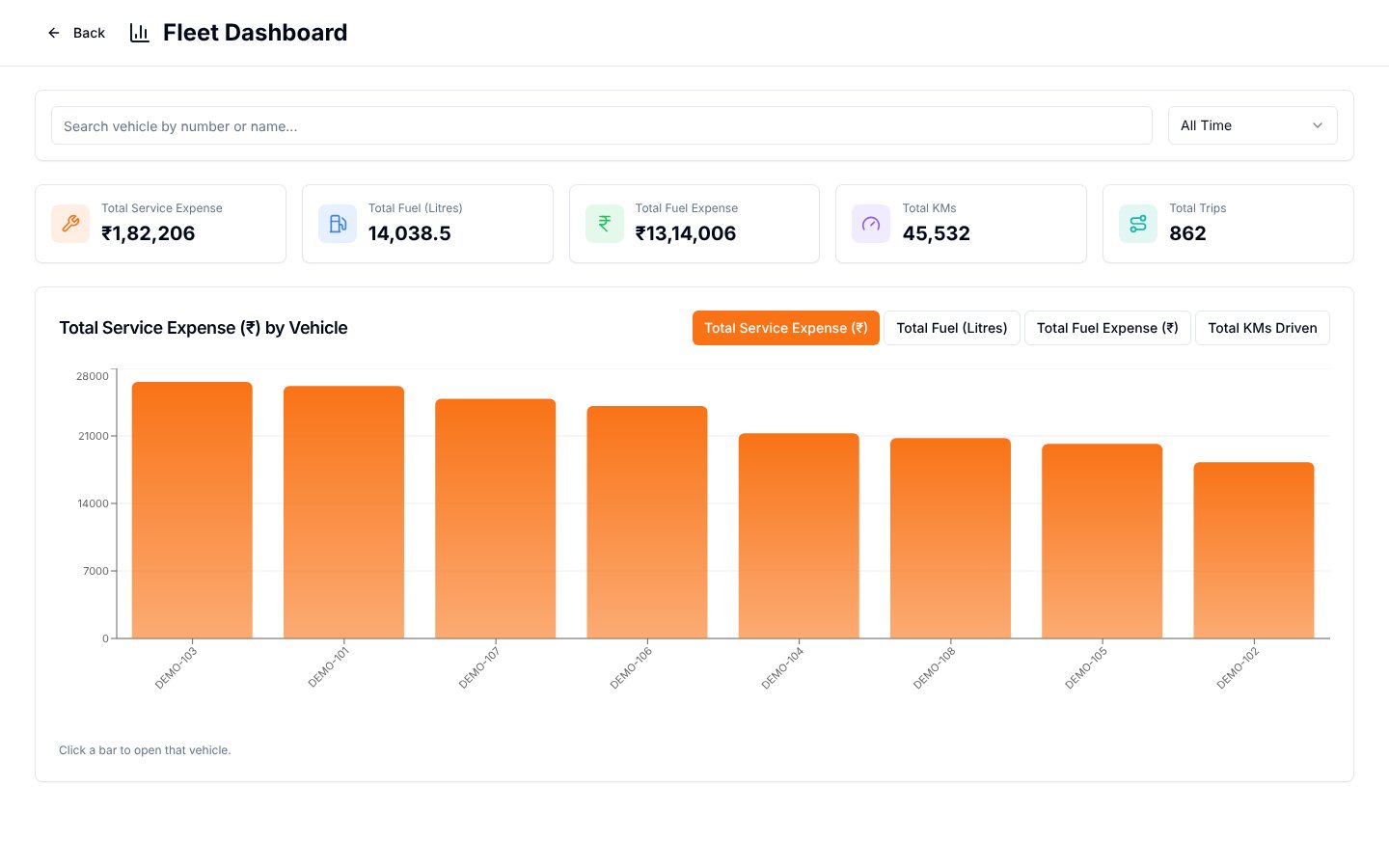
    Ranks the vehicles on service spend, litres, fuel spend or kilometres
    Fleet Dashboard with five totals and a bar chart of service expense by vehicle
  7. 07 / 08

    Open one vehicle

    You
    Clicks a bar
    It answers
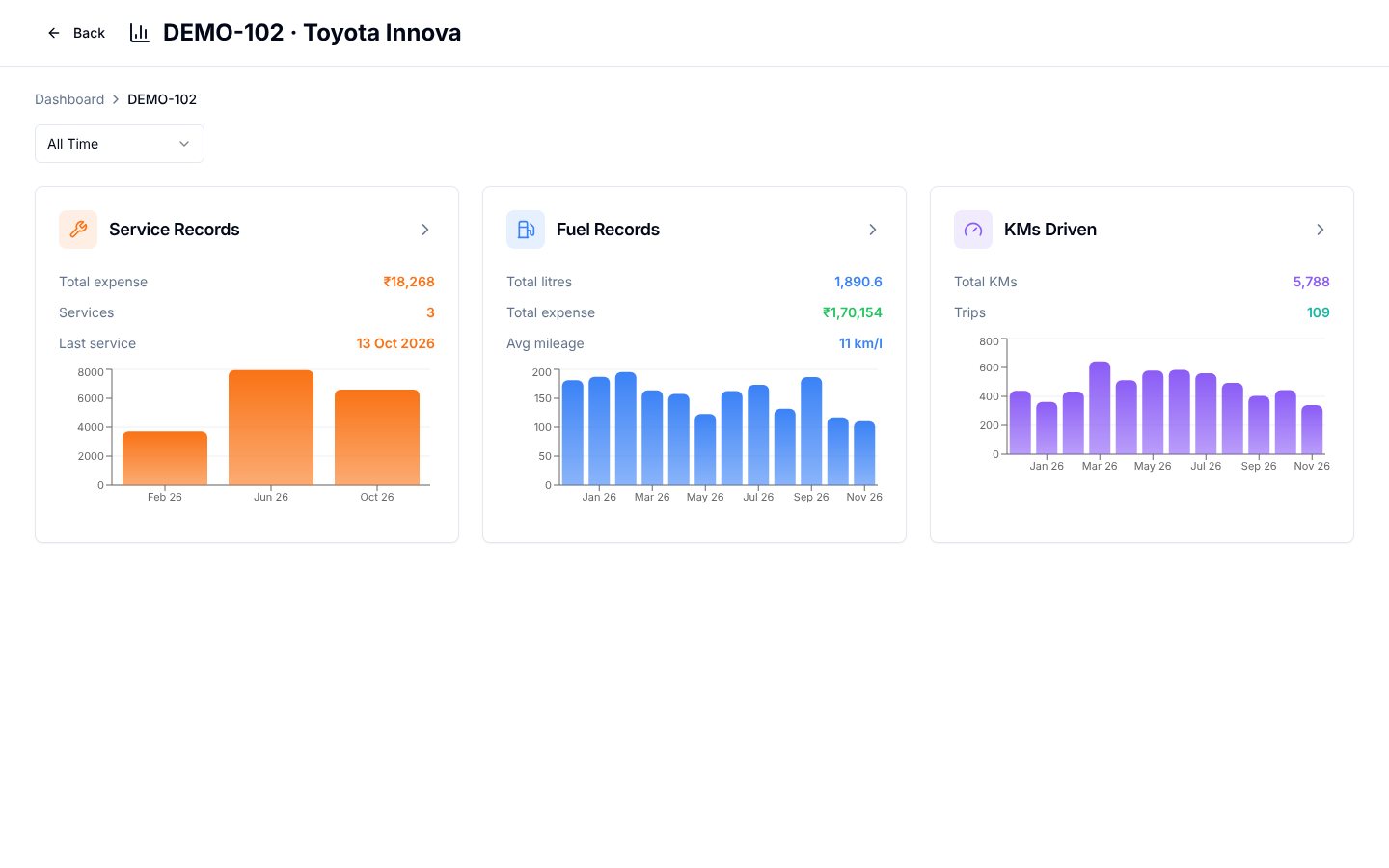
    Shows that vehicle’s service, fuel and kilometre history as three small charts
    One vehicle’s service, fuel and kilometres cards with monthly bar charts
  8. 08 / 08

    Act on the alerts

    You
    Opens notifications
    It answers
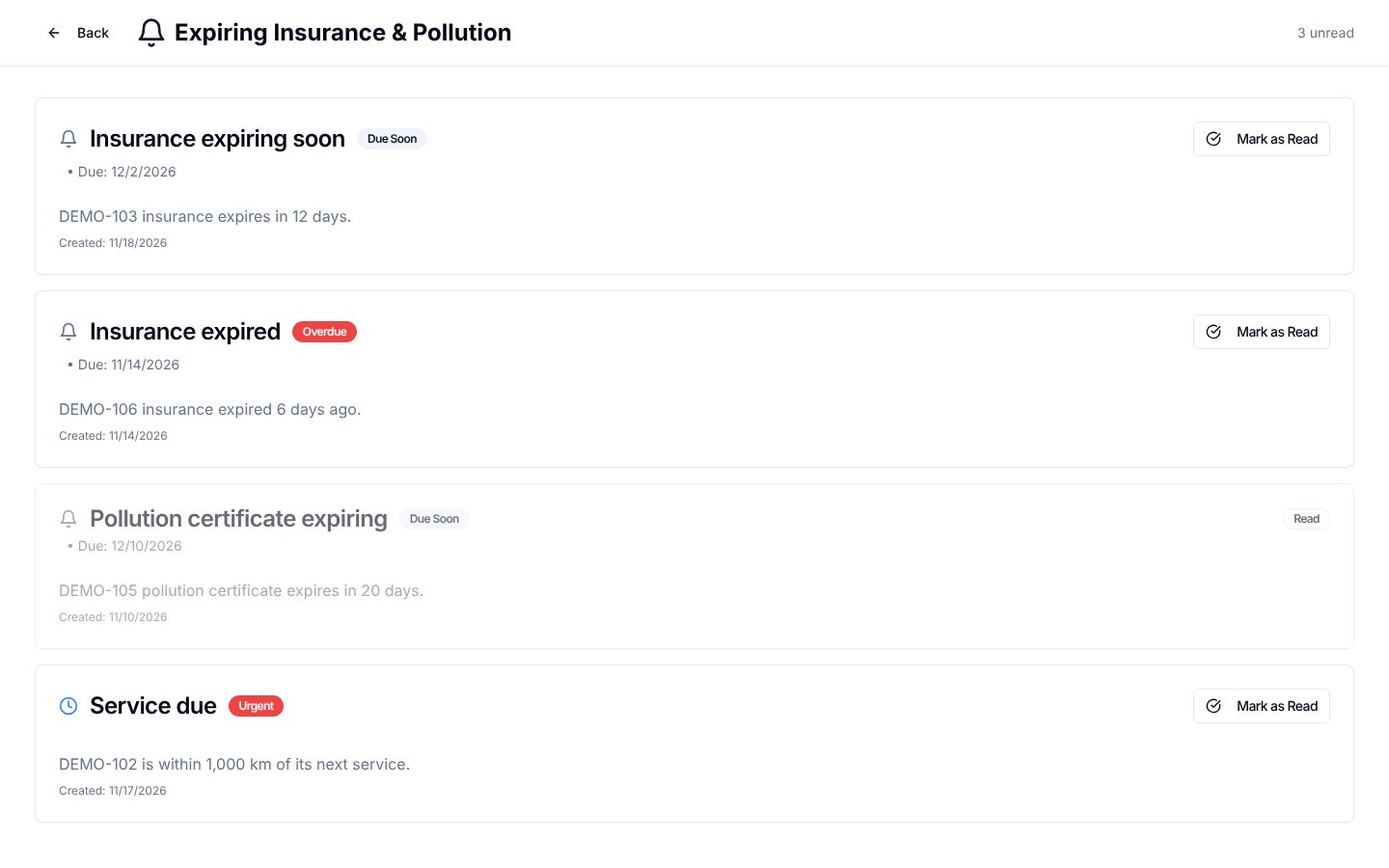
    Lists expiring and expired papers and services due, newest and most urgent first
    Notifications for insurance expiring, insurance expired, pollution certificate and service due

03 · What was special

What it stands on

  1. Alerts that arrive

    Insurance and pollution expiry checks run on their own and raise in-app alerts and emails before a paper lapses.

  2. One record, no repeats

    A duplicate invoice or pump slip is refused at entry, and fuel readings carry over from the last fill.

  3. Trips from a link

    A public form lets a driver log a trip without an account, and every change goes into an audit log.

The dates that cause trouble now watch themselves.

Making-Of

Every vehicle, driver, and trip is in one place, and the paperwork dates watch themselves.

The first commit in the repository; the Notion entry lists 25 Sep 2025 as its start

  1. The world before

    The transport department worked from manual logs, phone calls and spreadsheets. No one could see the whole fleet, and renewals for insurance and pollution certificates were missed.

  2. One day

    18 August 2025. An AI app builder was given the brief: sign-in, vehicles, service records and expense analysis. Twenty-nine commits landed that day, ending with an email check for expiring documents.

  3. Because of that

    1. Service entries took file uploads, and a round of security fixes followed (23–28 August).
    2. Routing rewrites were added for the host, after single-page routes returned not-found in production (25 September).
    3. A second build burst added fuel records, a fuel report, pump-slip fields and duplicate-invoice checks (February to March 2026).
    4. An audit log recorded who changed what (10 March), and a service-gap field fed service-due alerts (30 March).
    5. KMs Driven arrived with a public trip form, a dashboard with drill-down and Excel export (22 September to 11 November 2026).
  4. Until finally

    Fleet Manager is launched for the transport department. The main app has no public link; only the driver trip form is open.

  5. Since then

    The logbook import of 2,893 trips is done; the next import is still on the roadmap.

The evidence Process, hands, and artifacts

Process

  1. Origin

    Sign-in, vehicles, service records and expense analysis in one day

  2. Alerts

    Email and in-app checks for expiring documents

  3. Hardening

    Security fixes to access and email credentials

  4. Hosting

    Rewrite rules so every route works in production

  5. Fuel

    Fuel records, fuel report and bill uploads

  6. Audit

    An audit log module for every change

  7. Trips

    KMs Driven section; the trip form went public on 1 October

  8. Dashboard

    A dashboard with drill-down to each vehicle

Hands

Akshansh

  • The brief, the modules and the rules for each field
  • Review of every change and the logbook import

Agents

  • LovableBuilt and committed almost every change