Back to the shelf

030

Manzil TVC Seating Planner

Manzil means destination. I built it so Venus Remedies' new head office always knows where everyone sits.

Launched · Started March 2026 · Tool · Vibe-Coded

That's the whole thing.

The site's sound is off. The narration still plays.

This reading didn't load. The transcript is below.

Read the transcript

Manzil means destination. I built it for Venus Remedies' new corporate head office: someone had to map who sits where across every floor. In March twenty twenty-six I started with a drag-and-drop planner so admin and HR could place departments, track occupancy, and run reports. By October the scope deepened to individual seats, live, plus a navigate mode behind the QR code on every sign in the building.

Now it is one screen. Tap a team, seat everyone, drag people and areas in isometric view, and the department areas follow the seats. I designed it screen by screen, then built it with AI coding agents. It is live. Commissioning the full building is still in progress.

Narrated in my own cloned voice, generated with ElevenLabs v4.

Manzil means destination. It started in March 2026 as a drag-and-drop planner for the admin and HR teams at Venus Remedies’ new head office. The brief was simple: place departments on a floor, track occupancy, pull reports for space planning.

By October the scope had grown. The building needed individual seats, who sits where, updated live. I added a public navigate mode behind the QR code on every sign in the building, so you can scan a sign and find your way.

The app runs on one screen now. Tap a team and seat everyone at once, or drag teams and individual people. Department areas follow the seats in real time, rendered in isometric view. Every person gets a seat plate, and every plate can be downloaded from the signage template. An animated guide walks you through the whole app as you go.

I designed the whole thing screen by screen first, then built it using AI coding agents. That order mattered: the structure was clear before a single line of code existed.

Manzil is live. The building’s commissioning is still in progress, so the product is growing alongside the office it’s meant to serve.

The making

  • React
  • TypeScript
  • Vite
  • Tailwind CSS
  • Zustand

01 · The problem

Before it existed

What hurt

A new head office is too much to take in from spreadsheets. Admin and HR could not see who sits where, and visitors had no way to find a person or a room.

Who uses it

  • Admin team
  • HR team
  • Department heads
  • Management
  • Visitors and staff on campus
  • 164commits in eight months
  • 169sign types in the register
  • 2languages, English and Hindi

02 · The flow

7 steps, in the order they happen

  1. 01 / 07

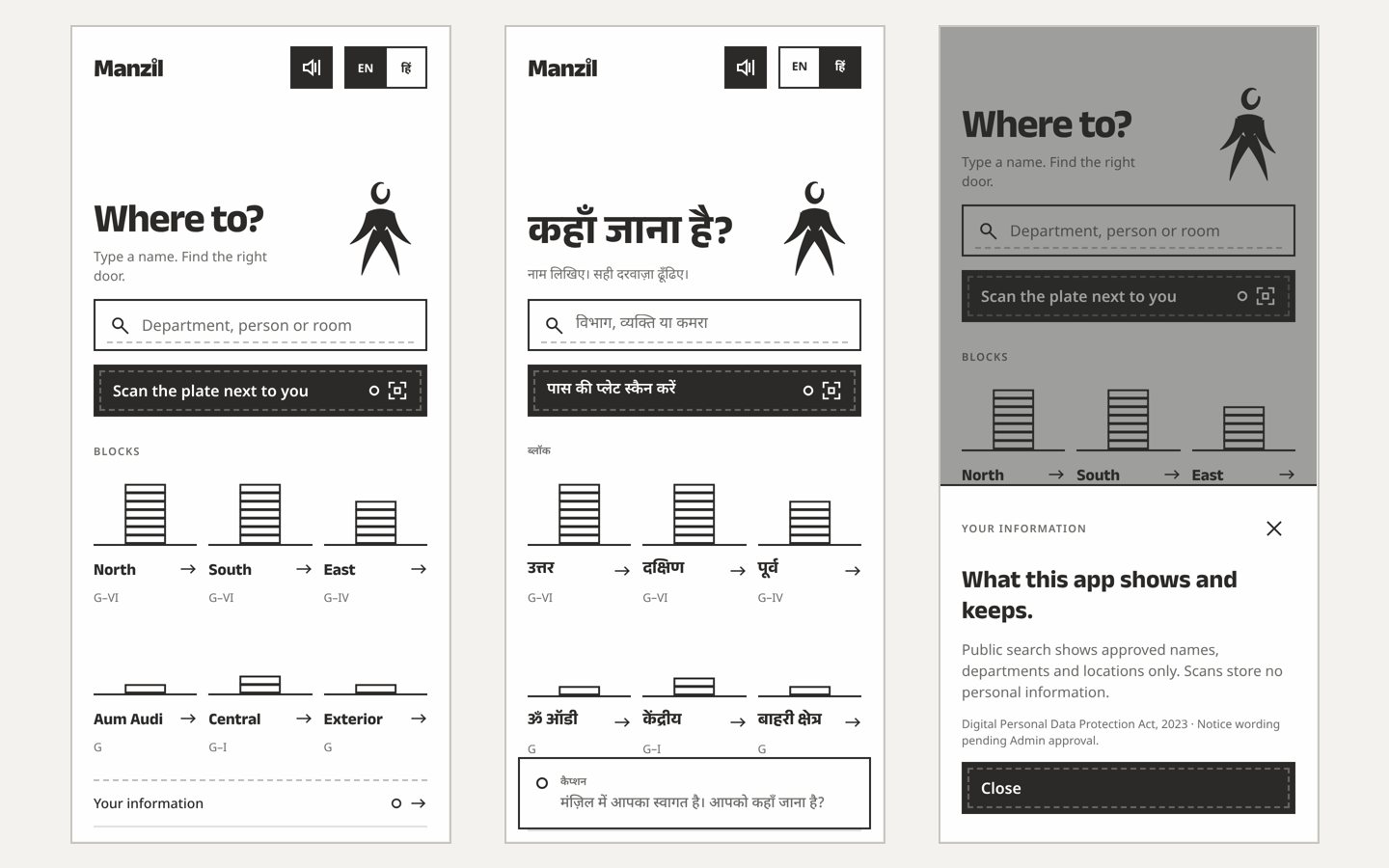
    Ask where to

    You
    Opens the public page from a sign’s QR
    It answers
    Offers one search box, a scan button and the six blocks, in English or Hindi
    Three phone screens: the Where to page in English, in Hindi, and the information notice
  2. 02 / 07

    Search a name or room

    You
    Types a department, a person or a room
    It answers
    Shows approved names, departments and places only, never private details
  3. 03 / 07

    Scan the plate beside you

    You
    Points the phone at a sign
    It answers
    Reads its permanent ID and names the place; scans store no personal information
  4. 04 / 07

    Follow the way

    You
    Walks to the place
    It answers
    Guides with a route, and keeps public places and routes available without a connection
  5. 05 / 07

    Open the staff home

    You
    Signs in as admin or HR
    It answers
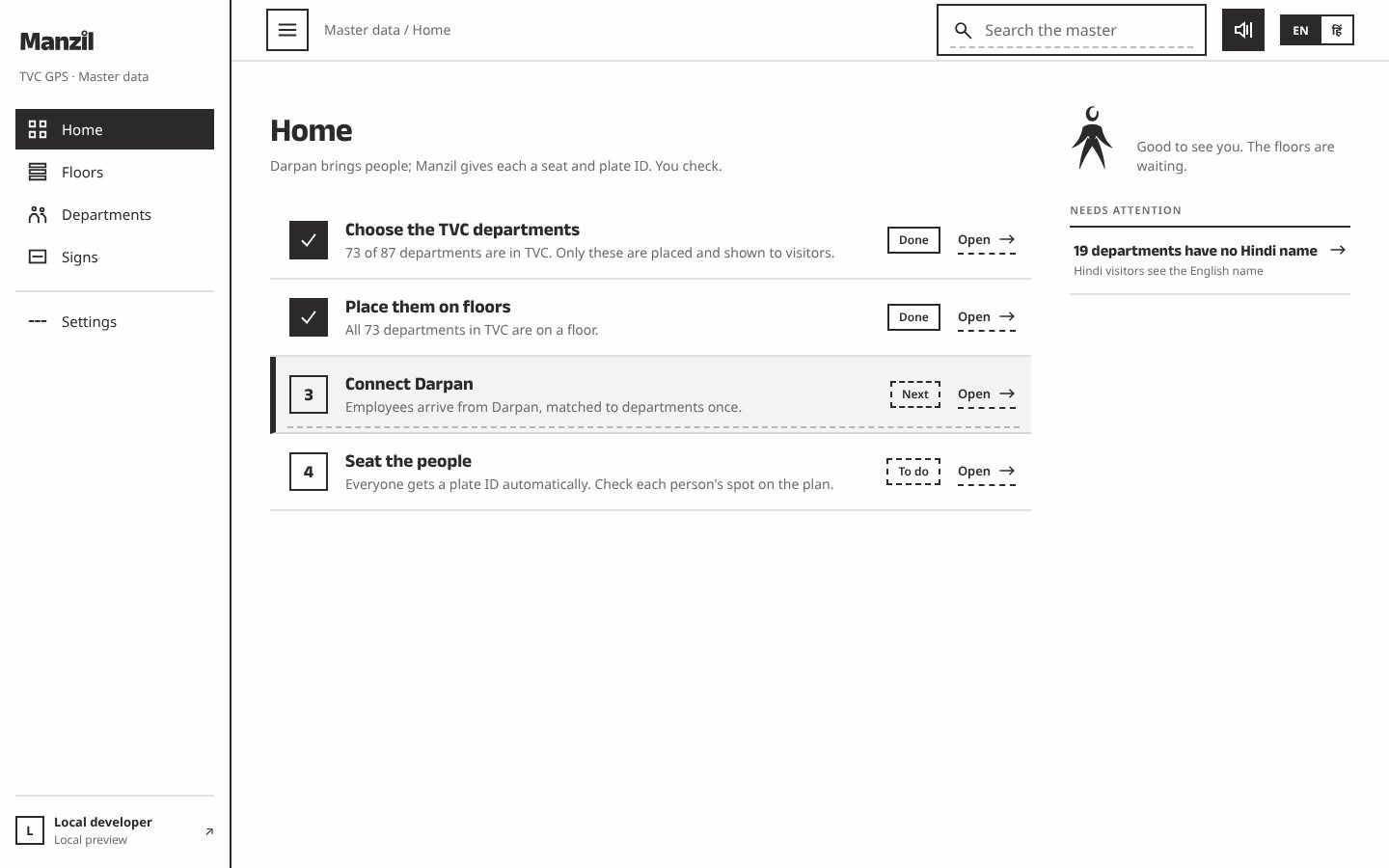
    Lists four set-up steps: choose departments, place them, connect the people source, seat people
    Staff home with four numbered set-up steps and a note about missing Hindi names
  6. 06 / 07

    Seat the people

    You
    Taps a team, seats everyone, drags teams and people
    It answers
    Moves department areas with the seats and keeps counts as a guide, never a block
  7. 07 / 07

    Print plates and codes

    You
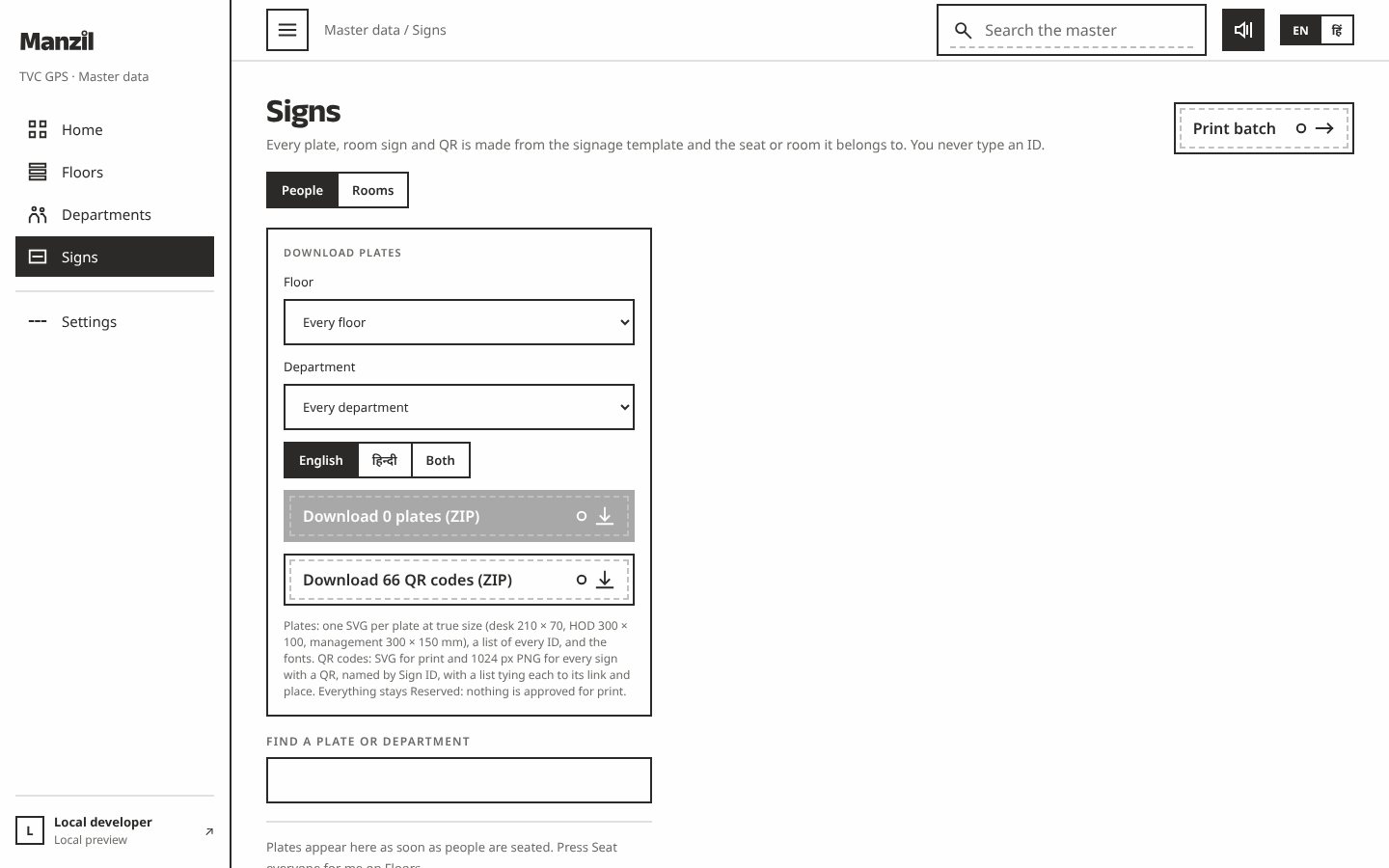
    Picks a floor, a department and a language
    It answers
    Draws every plate and QR sign from the signage template and zips the files for print
    Signs page with download options for plates and QR codes by floor, department and language

03 · What was special

What it stands on

  1. Signs and seats agree

    A permanent sign ID is reserved once, so the plate, the QR code and the search result always name the same place.

  2. Public, and private

    Visitors see approved names, departments and places. People without an HR code cannot be assigned to a seat.

  3. Designed first

    Every screen was drawn and approved on a board before code, then built by AI agents in reviewed pull requests.

One place name, from the planner to the sign to the visitor’s phone.

Making-Of

A building too large to picture, made visible one seat and one sign at a time.

The Notion build hub; the first commit followed on 11 March

  1. The world before

    Venus Remedies was moving into a new head office. Spreadsheets could not show spatial relationships, so planning who sits where stayed hard to see and hard to agree.

  2. One day

    10 March 2026. A drag-and-drop planner for the admin and HR teams: place departments on a floor, track occupancy, print reports. The first release shipped the next day.

  3. Because of that

    1. A read-only phone view and the department master data followed within days (11 March).
    2. By June the team still had not started using it, because the building itself was too much to take in; the redesign in September aimed at comprehension (25 September).
    3. Version 2 widened the scope to individual seats and a public Navigate mode behind the QR on every sign, with a Postgres backend (6 October).
    4. The Floors screen became one simple screen: tap a team, seat everyone, drag teams and people (9 October).
    5. Seventy-six named rooms and areas got place codes and QR signs, and Hindi copy arrived across the app (21 October).
    6. Ten decisions were put to Akshansh as picture cards and answered by tap (22 October).
  4. Until finally

    Manzil is live. Commissioning the whole building is still in progress.

  5. Since then

    The campus opens on 25 December 2026, and the planner grows alongside it.

The evidence Process, hands, and artifacts

Process

  1. Origin

    A drag-and-drop planner for admin and HR, local-first, no login

  2. Redesign

    A real name, a mark and every screen redrawn around comprehension

  3. Version 2

    Seats for people, a public Navigate mode, Postgres on Railway

  4. Build

    Codex executes the written brief; Claude Code continues from 8 October

  5. One screen

    Floors becomes one screen; areas follow the seats

  6. Rooms

    Named rooms with place codes and QR signs; Hindi throughout

  7. Decisions

    Ten picture cards answered by tap, then acted on

  8. Opening

    Planned: the campus opens; commissioning continues

Hands

Akshansh

  • Concept, scope and every product ruling
  • The screen-by-screen design before any code
  • Answers to the decision cards and review of each release

Agents

  • Claude CodeMost co-authored commits and the release reviews
  • CodexLed the version 2 build from a written brief
  • CursorEarly implementation and the September redesign
  • AmpCo-authored changes
  • SpiralThe Hindi and English copy